Your AI agent is live.
It is answering customer questions, completing requests, and handling interactions that previously required a human agent.
But something is not working the way it should.
Customers are repeating questions. Transfers are increasing. Some interactions appear successful in the reporting, yet customers are calling back because their issues were never fully resolved.
The natural reaction may be to adjust the AI's instructions, update a prompt, or ask the vendor to make changes.
But before changing anything, contact center leaders need to understand where the customer experience is actually breaking down.
Not every AI performance issue is caused by the AI itself.
Sometimes the problem is outdated information. Sometimes it is a poorly designed workflow. Other times, a connected system fails to complete the requested action.
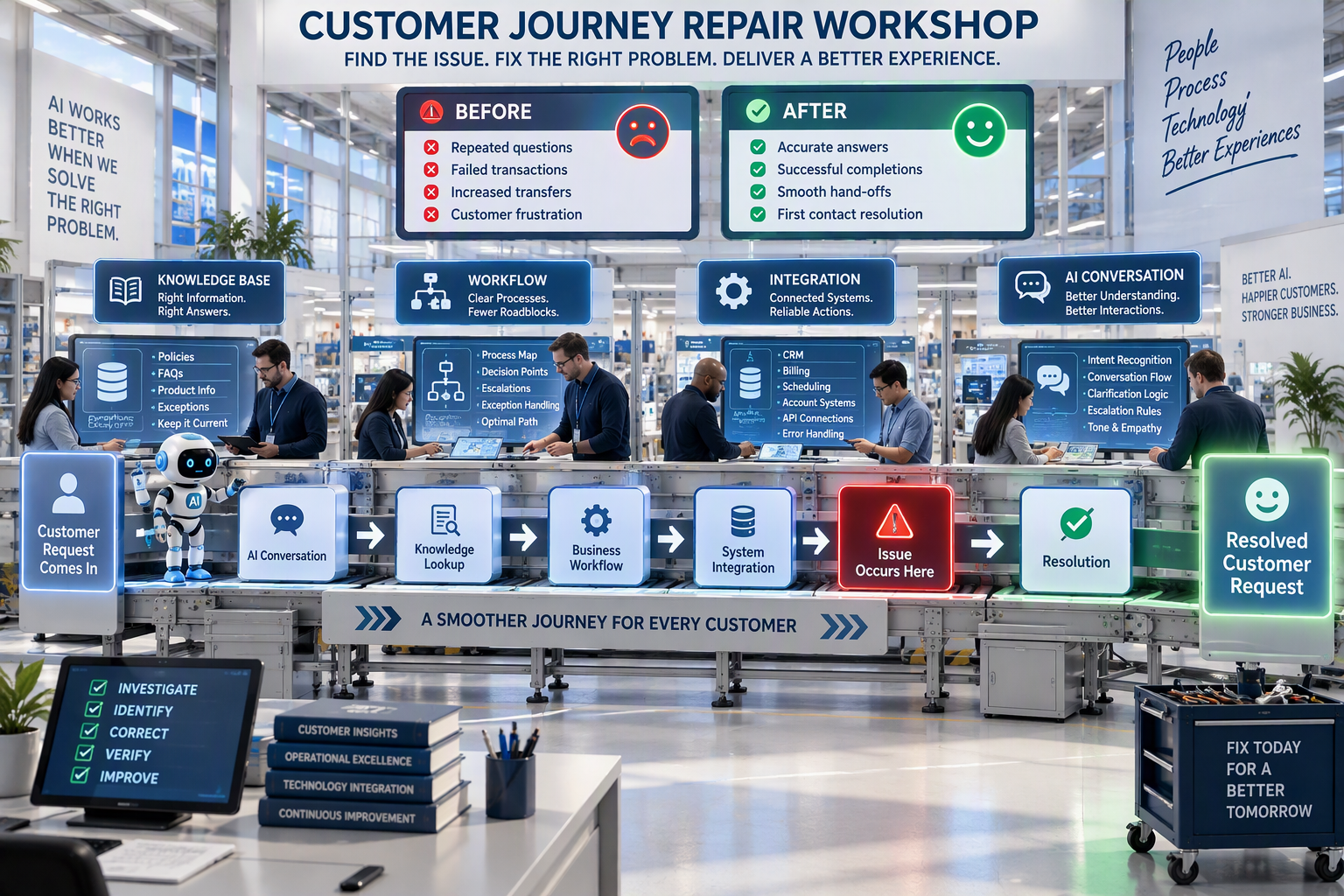
That is why effective AI troubleshooting should focus on four areas:
- Knowledge: Does the AI have access to accurate, complete information?
- Workflow: Is the customer journey designed to handle the request correctly?
- Integration: Are connected systems returning information and completing actions reliably?
- AI conversation handling: Is the AI understanding the customer and responding appropriately?
Understanding which area is causing the problem helps contact centers make the right corrections instead of repeatedly adjusting technology without addressing the underlying issue.
1. Start by Reviewing the Actual Customer Interaction
Before investigating the technology, look at what the customer experienced.
Select several examples of the same problem and review each interaction from beginning to end.
Include at least one successful interaction for comparison.
This helps identify where the unsuccessful conversations differ from those that worked as expected.
Your operations and quality assurance teams should ask:
- What was the customer trying to accomplish?
- What information did the customer provide?
- Where did the conversation first go off track?
- What should have happened at that point?
- Did the AI provide an incorrect answer or fail to complete an action?
- Was the customer's request actually resolved?
For voice interactions, compare the recording with the transcript.
A misunderstood account number, missed word, or incorrect transcription can change the direction of an entire conversation.
For example, a customer may ask to change an existing appointment, but the AI interprets the request as scheduling a new one.
The resulting problem may appear to be a workflow issue when the original failure happened during speech recognition or intent identification.
Practical Ways Contact Centers Can Implement This
- Review failed and successful interactions side by side. Identify the exact point where the experiences begin to differ.
- Create consistent failure categories. Separate incorrect answers, misunderstood requests, incomplete transactions, and unsuccessful transfers.
- Use customer complaints and repeat contacts as investigation triggers. These can reveal problems that standard AI reporting may not capture.
The more precisely you identify the failure, the easier it becomes to determine what needs to be fixed.
2. Check Whether the AI Has the Right Knowledge
One of the most common causes of inaccurate AI responses is the information behind them.
An AI agent cannot consistently provide reliable answers if its knowledge sources are outdated, incomplete, contradictory, or missing important exceptions.
This is especially important in contact centers where policies, products, pricing, and procedures change regularly.
Consider a customer asking about returning a damaged product.
The AI may have access to the company's standard return policy, but that policy might not explain the exception for damaged merchandise.
A human agent may know the correct process from experience.
The AI may not.
As a result, the customer receives an answer that sounds reasonable but does not apply to their situation.
Before changing the AI's instructions, contact centers should determine whether the correct information was available in the first place.
What Contact Centers Should Check
- Are knowledge articles current and approved?
- Are there conflicting policies or instructions?
- Are important exceptions documented?
- Does the information apply to the customer's specific product or situation?
- Can the AI access the appropriate knowledge source?
- Is there a clearly assigned owner responsible for keeping content updated?
Practical Ways Contact Centers Can Implement This
- Audit frequently used knowledge articles. Prioritize content related to high-volume inquiries, complaints, and repeated AI errors.
- Document policy exceptions. Make sure unusual but legitimate customer situations are clearly explained.
- Assign knowledge ownership. Establish who approves updates and how changes are communicated to the AI system.
When the underlying information is wrong, changing the prompt may not solve the problem.
Fix the source first.
3. Review the Customer Workflow for Gaps
Sometimes the AI understands the request and has the correct information, but the process itself creates problems.
This is where workflow design becomes important.
A customer interaction often involves multiple steps that must happen in the correct order.
For example, changing an appointment may require:
- Confirming the customer's identity
- Locating the existing appointment
- Checking available alternatives
- Confirming the customer's preferred time
- Saving the updated appointment
- Providing confirmation
If one of those steps is missing, repeated, or performed incorrectly, the interaction may fail even when the AI understands what the customer wants.
The same issue can occur with billing inquiries, account changes, order cancellations, or service requests.
Contact centers also need to consider exceptions.
What happens when the requested appointment is unavailable?
What if the customer changes their mind?
What if the request requires supervisor approval?
A workflow designed only for the ideal scenario may struggle with real customer behavior.
Practical Ways Contact Centers Can Implement This
- Map the complete customer journey. Document each step required to resolve the request, including exceptions and decision points.
- Identify unnecessary friction. Look for repeated verification, duplicate questions, and steps that add effort without improving the outcome.
- Review escalation paths. Confirm that the AI knows when to transfer a customer and that the receiving agent gets the relevant context.
The goal is not simply to make the AI follow the workflow.
It is to make sure the workflow supports the customer.
4. Verify That System Integrations Are Working Correctly
AI agents increasingly rely on connected business systems to complete customer requests.
These may include:
- Customer relationship management (CRM) platforms
- Billing systems
- Scheduling applications
- Order management platforms
- Customer authentication tools
- Knowledge management systems
When these integrations fail, the customer experience can break down even if the AI handles the conversation correctly.
For example, an AI agent may tell a customer that an appointment has been changed.
But did the scheduling system actually save the update?
Did the AI receive confirmation that the transaction succeeded?
Was the correct customer record modified?
These are important questions because a successful conversation does not always mean a successful transaction.
What Contact Centers Should Check
- Was the correct customer record retrieved?
- Did the connected system return accurate information?
- Was the requested action completed?
- Did the AI receive confirmation of success or failure?
- Were there timeouts or connection errors?
- What happened when the system was unavailable?
Practical Ways Contact Centers Can Implement This
- Compare AI conversations with system records. Verify that the actions described to customers actually occurred.
- Review integration logs. Work with IT or application teams to identify failed requests, timeouts, and incorrect responses.
- Test failure scenarios safely. Confirm how the AI responds when systems are unavailable, without creating duplicate transactions or changing live customer records unnecessarily.
When an integration is failing, rewriting the AI's instructions will not repair the connection.
The team needs to fix the system issue.
5. Evaluate How the AI Handles Customer Conversations
Once knowledge, workflows, and integrations have been reviewed, examine the AI's conversation behavior.
This is where the AI's instructions, intent recognition, clarification process, and escalation logic become important.
Sometimes the AI has everything it needs to resolve the issue but does not use that information correctly.
It may:
- Misunderstand the customer's intent
- Ignore information already provided
- Make assumptions instead of asking clarifying questions
- Repeat the same response
- Continue a conversation when it should escalate
- Follow conflicting instructions
For example, the AI may be instructed to complete as many interactions as possible while also being told to transfer certain requests to a human.
If those instructions are not clearly prioritized, the AI may continue trying to resolve an issue that should have been escalated.
Practical Ways Contact Centers Can Implement This
- Review AI instructions and escalation rules. Look for conflicting directions, unclear boundaries, and missing guidance for unusual situations.
- Test different versions of the same request. Include interruptions, incomplete information, changes of mind, and unexpected phrasing.
- Evaluate clarification behavior. Make sure the AI asks appropriate follow-up questions instead of guessing when information is missing.
One successful test does not mean the issue has been resolved.
The AI should perform consistently across realistic variations of the customer interaction.
6. Make Controlled Changes and Verify the Results
Once the team identifies a likely cause, the next step is to make a controlled correction.
This is where organizations need to avoid changing too many things at once.
If the knowledge article, workflow, integration, and AI instructions are all modified simultaneously, it becomes difficult to determine which change actually solved the problem.
A more structured approach makes troubleshooting easier.
Start by documenting the issue, assigning an owner, and identifying the expected improvement.
Then test the correction against the original failed interactions.
Just as importantly, retest successful scenarios to confirm that the change did not introduce new problems.
Practical Ways Contact Centers Can Implement This
- Maintain an AI issue and change log. Record the problem, root cause, assigned owner, corrective action, and test results.
- Retest both failed and successful scenarios. Confirm that the original issue is resolved without disrupting other workflows.
- Monitor performance after deployment. Watch for repeat failures, changes in customer satisfaction, and unexpected escalation trends.
Some issues will involve more than one area.
For example, an incomplete knowledge article may cause the AI to select the wrong workflow, which then triggers an unsuccessful integration request.
Keeping the evidence together helps teams understand how those problems connect.
For high-risk failures involving sensitive customer information, unauthorized actions, or serious compliance concerns, contact centers should pause the affected automated workflow until the issue is investigated and appropriate controls are restored.
How Contact Centers Can Build a Better AI Troubleshooting Process
AI troubleshooting should not depend on someone noticing a problem and manually figuring out who to contact.
As AI becomes more integrated into customer service, organizations need a repeatable process for identifying, investigating, correcting, and preventing performance issues.
That process should bring together the right expertise.
Operations teams understand customer journeys and business processes.
Quality assurance teams can identify conversation patterns and evaluate customer outcomes.
Knowledge management teams maintain the information AI uses to answer questions.
IT and application teams investigate integrations, data flow, and system reliability.
AI platform owners and vendors can help evaluate configuration, model behavior, and technical limitations.
Practical Ways Contact Centers Can Implement This
- Create a standard AI troubleshooting checklist. Start with the customer interaction, then review knowledge, workflow, integration, and conversation handling.
- Assign clear ownership by issue type. Make sure teams know who investigates each category of problem.
- Review recurring failures regularly. Use repeat contacts, customer complaints, failed transactions, and escalation trends to prioritize improvements.
This approach helps contact centers move from reacting to individual complaints toward identifying and correcting recurring operational problems.
The Goal Is to Fix the Customer Experience, Not Just the AI
When an AI agent starts producing unexpected results, it is easy to assume the technology itself is the problem.
But that is not always the case.
An inaccurate answer may come from outdated knowledge.
An incomplete request may come from a broken workflow.
A failed transaction may come from an integration.
And a frustrating conversation may come from unclear AI instructions or poor escalation logic.
The important thing is knowing how to tell the difference.
Before making changes, start with the customer interaction and identify where the experience first went wrong.
Then bring in the right people, correct the underlying issue, and verify that the customer can successfully complete the request.
AI performance improvement should not be about constantly adjusting prompts and hoping for better results.
It should be about understanding the problem, making informed corrections, and measuring whether those corrections actually worked.
That is how contact centers build AI experiences that become more reliable over time.
Ready to Improve AI Agent Performance in Your Contact Center?
At CloudNow Consulting, we help organizations evaluate, implement, and optimize AI and contact center solutions based on their operational needs and customer experience goals.
Whether your AI agent is experiencing recurring errors, unsuccessful transfers, integration problems, or inconsistent customer outcomes, our team can help you assess the technology and identify opportunities for improvement.
Reach out to CloudNow Consulting today to discuss how to build a more reliable, effective AI-powered customer experience.
FAQs: Troubleshooting AI Agents in Contact Centers
1. What are the most common causes of AI agent performance problems in contact centers?
Common causes include outdated or incomplete knowledge sources, poorly designed customer workflows, unreliable system integrations, and AI conversation handling issues. Contact centers should investigate each area before deciding what needs to change.
2. How can contact centers determine whether an AI issue is caused by the technology or the workflow?
Start by reviewing the actual customer interaction and identifying where the failure occurred. Then compare the AI's response with approved knowledge, the expected workflow, and the results recorded in connected systems. This helps determine whether the problem involves information, process design, integration, or AI behavior.
3. What should contact centers do after fixing an AI agent issue?
Retest the original failed interactions, verify that successful workflows still function correctly, and monitor performance after the change is deployed. Document the corrective action and continue tracking customer resolution, repeat contacts, escalations, and related errors to confirm that the issue has been resolved.
Want to be the first to know when new blogs are published? Sign up for our newsletter and get the latest posts delivered straight to your inbox. From actionable insights to cutting-edge innovations, you'll gain the knowledge you need to drive your business forward.