
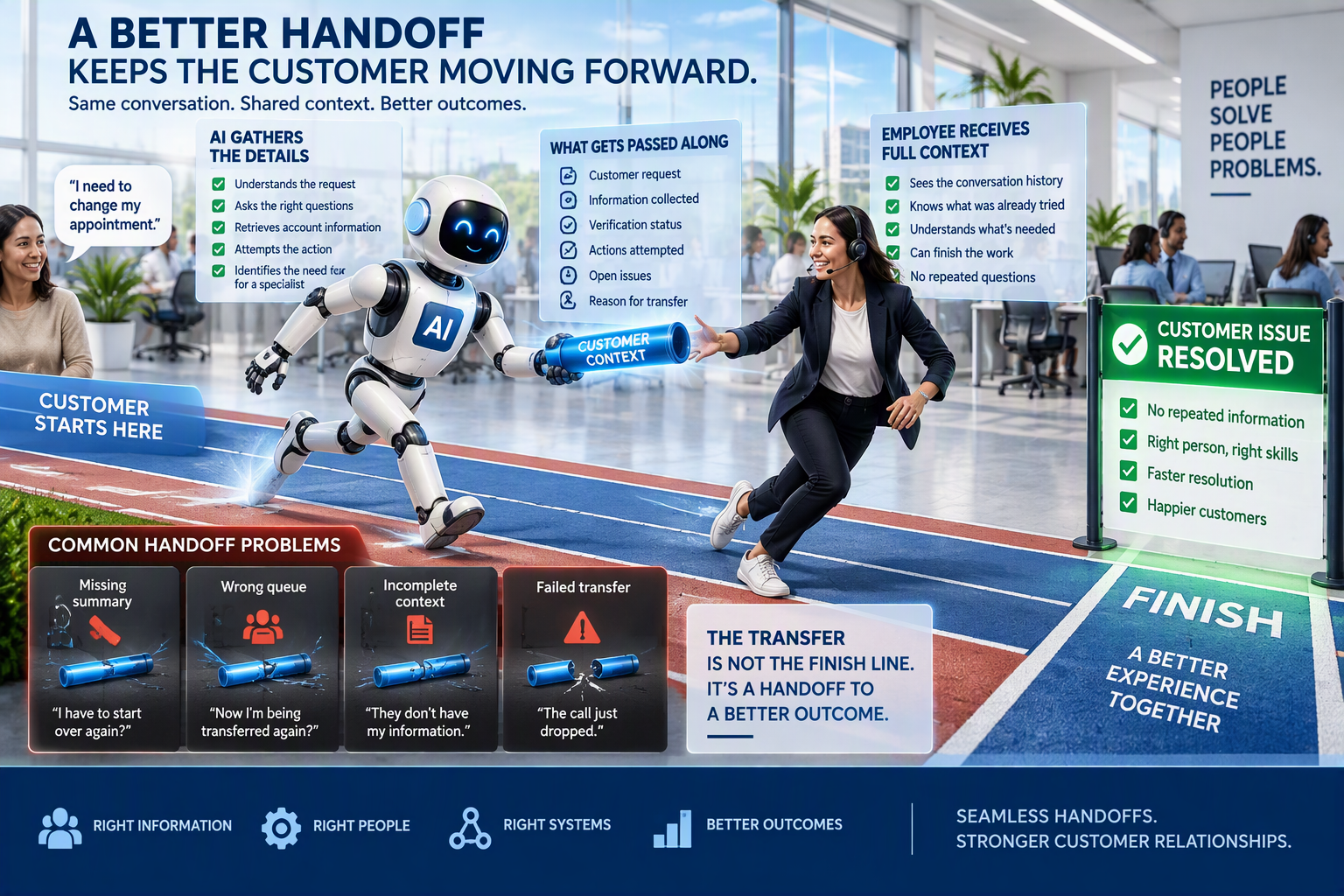
A customer contacts your company with a problem.
They explain the issue, answer several questions, and spend time working through the conversation with an AI agent.
Then the AI decides a human needs to step in.
The customer is transferred, only to hear:
"Can you explain what happened?"
Now they have to start all over again.
That is exactly the kind of experience contact centers should be working to eliminate.
AI agents are becoming more capable of handling customer interactions independently. But even the most advanced AI cannot resolve every situation.
Some requests require human judgment. Others involve exceptions, approvals, or system limitations that automation cannot safely handle.
The challenge is not just knowing when AI should transfer a customer.
It is making sure the transfer actually helps the customer move forward.
A successful AI to human handoff should feel like one continuous conversation, not two separate experiences.
Here are seven areas contact centers should focus on to make that happen.
1. Establish Clear Rules for When AI Should Escalate
The first step is defining when an AI agent should stop trying to resolve an issue and bring in a person.
Without clear escalation rules, AI may continue asking questions, repeating instructions, or attempting the same action even when the conversation is no longer productive.
This creates frustration for customers and unnecessary work for employees.
Common escalation triggers include:
- A customer directly requests a human agent
- The issue requires approval or an exception to company policy
- The request falls outside the AI's authority
- The AI cannot confidently determine the customer's intent
- A connected system fails or returns an uncertain result
- The customer repeatedly provides information without making progress
- The interaction involves a sensitive or high-risk situation
Contact centers should also define what happens when an AI transaction fails.
For example, if an appointment update times out, the AI should not automatically retry the request without knowing whether the original transaction was completed.
Doing so could create duplicate bookings or conflicting records.
Practical Ways Contact Centers Can Implement This
- Create escalation rules for each customer journey. Define which requests AI can complete independently and which require human assistance.
- Set limits on repeated attempts. Establish when AI should stop asking customers to rephrase or retry a failed process.
- Build safeguards for uncertain transactions. Require verification before repeating actions that may have already been completed.
The goal is not to eliminate transfers.
It is to make sure customers reach the right person when automation can no longer help.
2. Route Customers to the Right Human Agent
Getting a customer out of the AI conversation is only part of the process.
The next question is where that customer goes.
Sending every escalated interaction to a general support queue may create additional transfers, longer wait times, and more frustration.
Instead, contact centers should route customers based on the type of assistance required.
For example, a billing dispute may need an employee who has permission to review and adjust charges.
A technical issue may require a specialized support team.
A policy exception may need someone with approval authority.
Routing should consider:
- Customer intent
- Required employee skills
- Department responsibilities
- Approval authority
- Language preferences
- Team availability
- Hours of operation
An employee may understand the customer's issue but still lack the access or authority needed to resolve it.
That distinction matters.
Practical Ways Contact Centers Can Implement This
- Map escalation reasons to specific queues. Route customers based on the skills and permissions required to complete the request.
- Review employee access and authority. Confirm that receiving teams can perform the actions customers need.
- Establish ownership across departments. Make sure customers are not responsible for coordinating internal transfers.
A good handoff gets the customer to someone who can actually finish the work.
3. Make Sure Customer Context Follows the Transfer
One of the biggest frustrations with AI to human transfers is having to repeat information.
Customers have already explained the issue.
They may have provided account details, answered verification questions, or worked through several troubleshooting steps.
When that information disappears during the handoff, the customer feels like their time was wasted.
A strong transfer process should provide the receiving agent with enough context to continue the interaction.
Important information includes:
- The customer's original request
- The reason for escalation
- Relevant information already collected
- Actions the AI attempted
- Actions confirmed as completed
- Outstanding issues
- Any commitments made to the customer
However, accuracy matters just as much as completeness.
For example, if an AI agent attempted to update an appointment but the system timed out, the summary should not say the appointment was successfully changed.
It should clearly explain that the result is uncertain and requires verification.
Practical Ways Contact Centers Can Implement This
- Use AI-generated handoff summaries. Provide concise descriptions of the issue, completed steps, and unresolved work.
- Separate attempted actions from confirmed outcomes. Prevent employees from relying on inaccurate transaction information.
- Preserve verification status securely. Transfer relevant authentication status through approved systems without exposing passwords or sensitive credentials.
The receiving agent should understand what happened before the transfer and what needs to happen next.
4. Confirm That Employees Can Access the Information
Having a conversation summary available somewhere in the system does not necessarily mean the handoff works.
The information needs to be accessible when the employee begins helping the customer.
This is where contact centers should test the actual agent desktop experience.
Can the employee see the summary immediately?
Is it connected to the correct customer record?
Does it arrive before the employee answers?
Can the agent review the original conversation if something needs clarification?
These details can determine whether the transfer feels seamless or frustrating.
AI-generated summaries also need quality checks.
They may occasionally omit important corrections, misinterpret a customer's request, or describe an attempted action as completed.
Employees should be able to verify important details rather than relying entirely on the summary.
Practical Ways Contact Centers Can Implement This
- Test transfers using the actual agent desktop. Confirm that summaries and customer records appear correctly during live workflows.
- Review AI-generated summaries for accuracy. Compare them against conversation transcripts and system records.
- Give agents access to original interaction details. Allow employees to review relevant conversation history when additional context is needed.
The purpose of the summary is to reduce work, not create another source of confusion.
5. Plan for Unavailable Agents and Failed Transfers
What happens when the AI needs to transfer a customer, but nobody is available?
This is an important part of the customer journey that can easily be overlooked.
The preferred department may be closed.
The queue may be full.
The connection may fail during the transfer.
Or the customer may contact the business outside normal operating hours.
Without a fallback process, customers can become stuck between automation and human support.
Contact centers need to define what happens when an immediate transfer is not possible.
Depending on the operation, alternatives may include:
- Routing to another qualified team
- Offering a callback
- Creating a support case
- Scheduling follow-up assistance
- Providing accurate information about service availability
The AI should never promise an immediate human transfer when that option is unavailable.
Practical Ways Contact Centers Can Implement This
- Create fallback routing options. Establish alternatives when the preferred team cannot accept the interaction.
- Verify callback and case creation. Confirm that requests are successfully recorded and assigned to the appropriate team.
- Monitor dropped transfers. Identify interactions that disconnect during the handoff and establish a recovery process.
Customers should always understand what happens next, even when immediate assistance is unavailable.
6. Test the Complete Handoff Experience Before Deployment
A transfer message appearing on the screen does not mean the customer successfully reached a human agent.
Contact centers need to test the entire handoff.
That means following the interaction from the AI conversation through routing, employee acceptance, and eventual resolution.
Testing should include situations such as:
- A customer requesting a human immediately
- A customer correcting information before transfer
- An AI transaction with an uncertain result
- A closed or unavailable support queue
- A dropped connection during transfer
- An employee receiving incomplete context
- A customer requiring a different language or specialized support
These scenarios help identify problems that may not appear during a standard demonstration.
Practical Ways Contact Centers Can Implement This
- Run end-to-end transfer tests. Follow interactions until a human accepts the request or an approved fallback process takes over.
- Test across communication channels. Verify handoffs through voice, chat, and messaging where applicable.
- Confirm the final outcome. Check that the correct employee received the interaction and that the resulting case or system record is accurate.
A successful transfer should be measured by what happened after escalation, not simply whether the AI triggered it.
7. Monitor What Employees Have to Repeat or Correct
Even a well-designed handoff process needs ongoing improvement.
Once AI is live, employees can provide valuable insight into where transfers are creating unnecessary work.
They may notice that summaries regularly leave out important details.
They may receive customers who were routed to the wrong department.
Or they may need to repeat verification steps because information was not transferred correctly.
These issues may not always appear in automated reporting.
That is why employee feedback should be part of the performance review process.
Contact centers should monitor:
- Repeat information requests
- Additional transfers after the initial handoff
- Missing or inaccurate customer context
- Failed transfer rates
- Customer waiting time
- Resolution rates after escalation
- Employee corrections to AI-generated summaries
Practical Ways Contact Centers Can Implement This
- Collect structured agent feedback. Give employees a simple way to report missing information, incorrect routing, and recurring handoff problems.
- Review transferred interactions regularly. Compare employee feedback with customer complaints, transfer data, and resolution outcomes.
- Assign ownership for improvements. Document changes to routing, summaries, and workflows, then verify that they resolved the issue.
A small improvement, such as adding one missing field to a handoff summary, can eliminate repeated questions across hundreds of interactions.
How to Measure AI to Human Handoff Success
Contact centers should evaluate handoff performance as part of their broader AI monitoring strategy.
A high transfer rate is not automatically bad.
And a low transfer rate is not automatically good.
What matters is whether customers reach the appropriate resource and receive the help they need.
Useful measures include:
Successful Transfer Rate: How often customers reach the intended employee or approved fallback process.
Transfer Accuracy: Whether the interaction reaches the correct team based on the customer's request.
Context Transfer Accuracy: Whether employees receive complete and reliable information from the AI conversation.
Repeat Information Rate: How often customers must repeat details they already provided.
Resolution After Transfer: Whether the receiving employee successfully completes the customer's request.
Customer Satisfaction After Escalation: How customers feel about the overall experience, including the AI conversation and human assistance.
Additional Transfer Rate: How often customers are transferred again because the initial routing was incorrect.
Practical Ways Contact Centers Can Implement This
- Create a dedicated handoff performance dashboard. Track routing accuracy, successful transfers, repeat information, and resolution outcomes.
- Review results by escalation reason. Identify which workflows consistently create delays or unnecessary transfers.
- Compare customer and employee feedback. Use both perspectives to understand whether the handoff experience is improving.
These metrics help leaders understand whether AI and human support are working together effectively.
The Best AI Handoffs Make the Customer Experience Feel Continuous
AI agents will continue taking on more customer service responsibilities.
But there will always be situations where a person needs to step in.
That is not a weakness in the technology.
It is part of delivering the right customer experience.
The real challenge is making sure the customer does not lose progress during the transition.
A successful handoff gives the receiving employee a clear understanding of the issue, the actions already attempted, and what remains unresolved.
It also gives the customer confidence that someone is taking ownership of the request.
Contact center leaders should regularly review transferred interactions with the employees receiving them.
Ask what information was missing.
Ask which details needed to be checked.
Ask where the employee had to start over.
Those answers often reveal practical improvements that make the experience easier for everyone.
The goal is not simply to move customers from AI to humans. It is to make sure the customer continues moving toward resolution.
Ready to Improve AI to Human Handoffs in Your Contact Center?
At CloudNow Consulting, we help organizations evaluate, implement, and optimize AI and contact center solutions that support smoother customer journeys and better operational performance.
From escalation workflows and intelligent routing to agent desktop integration and ongoing performance monitoring, our team can help identify opportunities to improve how AI and human agents work together.
Reach out to CloudNow Consulting today to discuss how your contact center can create more seamless, efficient customer experiences.
FAQs: AI to Human Handoffs in Contact Centers
1. What information should an AI agent transfer to a human agent?
An AI agent should provide the customer's request, reason for escalation, relevant information already collected, actions attempted, confirmed outcomes, unresolved issues, and any commitments made during the conversation. Sensitive information should be handled according to approved security and authentication procedures.
2. How can contact centers prevent customers from repeating themselves after an AI transfer?
Contact centers should integrate AI conversation history and summaries with the agent desktop, ensure the information is available before the employee begins responding, and regularly test handoffs for missing or inaccurate context. Employee feedback can also help identify recurring gaps.
3. How should contact centers measure the success of AI to human transfers?
Important measures include successful transfer rate, routing accuracy, context transfer accuracy, repeat information rate, resolution after transfer, customer satisfaction, and additional transfers. These metrics help determine whether the handoff actually moves the customer closer to resolution.
Want to be the first to know when new blogs are published? Sign up for our newsletter and get the latest posts delivered straight to your inbox. From actionable insights to cutting-edge innovations, you'll gain the knowledge you need to drive your business forward.